Star Rating and Review Widget Vector for Modern UI Design
Why Star Rating Visuals Matter in Digital Design
Visual representation of feedback is a cornerstone of user experience in digital products. The Star Rating and Review Widget Vector offers a clean, modern solution for designers looking to integrate intuitive review elements into apps, dashboards, and web interfaces. These scalable graphics help communicate quality, build trust, and guide user decisions through a universally recognized symbol — the five-star rating system.
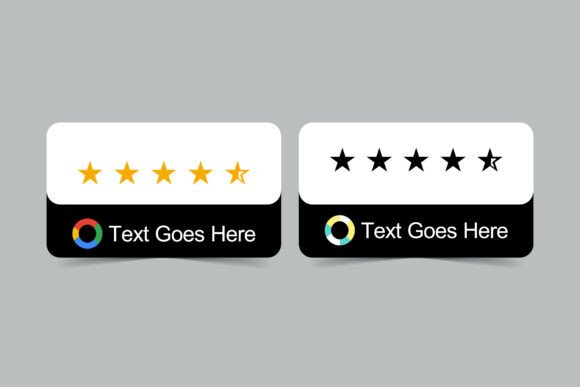
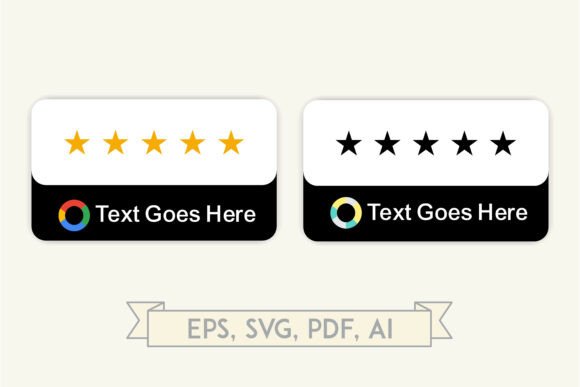
Whether you're designing a product landing page, a customer review section, or a mobile app dashboard, the visual clarity of a well-crafted star rating system can significantly enhance usability. The Star Rating and Review Widget Vector includes two distinct badge styles — one in gold for premium or featured reviews, and one in monochrome for neutral or secondary use. These options allow designers to create visual hierarchies while maintaining a cohesive aesthetic.
Time-Saving Design with Scalable Vector Graphics
Designers often face tight deadlines and evolving project requirements. Using pre-made vector assets like the Star Rating and Review Widget Vector helps streamline the design process without sacrificing quality. Since these graphics are available in AI, EPS, PDF, and SVG formats, they scale seamlessly across devices and screen resolutions. This flexibility ensures that your design remains crisp and professional whether it's viewed on a smartphone or a printed presentation.
For professionals working on landing pages or mobile app prototypes, having a ready-to-use star rating component can eliminate the need to build these elements from scratch. The minimalist design of the widget set supports rapid integration into existing UI kits, allowing more time to focus on layout, interaction, and content strategy.
Enhancing Trust and User Engagement
In digital environments, trust is often built through visual cues. A well-designed star rating badge can signal credibility and reliability. The Star Rating and Review Widget Vector supports this by offering a clean, professional look with soft shadows, rounded corners, and balanced spacing — all design elements that contribute to a sense of approachability and professionalism.
Consider a SaaS product page that showcases user testimonials. By incorporating a gold star rating badge next to a featured review, the designer can draw attention to high-value feedback. Meanwhile, a monochrome version can be used for average ratings or secondary content areas. This dual-style approach allows for a consistent yet flexible design language that supports both branding and user navigation.
Supporting Creativity Without Limiting Flexibility
Designers often need assets that are both functional and adaptable. The Star Rating and Review Widget Vector includes circular logo placeholders and minimalist text fields, allowing for easy customization. Whether you're creating a dashboard that displays customer ratings or a mobile app interface that shows product reviews, these components can be tailored to fit various brand identities and layout structures.
For example, an educator designing an online course platform might use the monochrome badge to represent course ratings, while a startup launching a new app could use the gold badge to highlight top reviews on their homepage. The vector format makes it easy to adjust colors, spacing, and typography to match specific design systems or brand guidelines.
Improving Communication in Dashboards and Reports
Data visualization is not just about charts and graphs — it's also about how information is interpreted at a glance. In dashboard design, the Star Rating and Review Widget Vector serves as a quick visual indicator of performance or user satisfaction. Whether used in a business intelligence dashboard or a customer feedback report, these star rating elements provide an immediate sense of value and quality.
Imagine a marketing team presenting quarterly performance data. A star rating graphic can be used to summarize customer satisfaction scores or product ratings within a slide or report. Because the graphics are provided in print-ready formats, they can be seamlessly embedded into PDF reports, slide decks, or printed materials without loss of quality.
Who Benefits Most from Star Rating UI Elements?
Professionals across industries can benefit from integrating the Star Rating and Review Widget Vector into their projects. UX/UI designers working on mobile applications or web interfaces will appreciate the clean, scalable nature of the graphics. Entrepreneurs launching digital products can use these visuals to enhance landing pages and build credibility with potential customers.
Content creators, educators, and small business owners may find these elements useful when designing presentations, marketing materials, or customer feedback forms. The ability to customize the graphics ensures that they can be adapted to different use cases, from showcasing product reviews to summarizing user surveys.
Considerations for Best Use
While the Star Rating and Review Widget Vector offers a high degree of flexibility, it's important to consider how these graphics will be used within the broader context of a design. For instance, if your project requires a highly customized or stylized rating system, you may need to modify the provided assets or combine them with other UI components.
Additionally, while the vector format supports scalability, it's still important to ensure that the design aligns with accessibility standards. For example, contrast between the star colors and background should be sufficient for users with visual impairments. When using the monochrome badge, consider adding text labels or tooltips to clarify the rating value.
Getting the Most Out of Your Design Assets
The Star Rating and Review Widget Vector comes in a ZIP archive containing AI, EPS, PDF, and SVG files — all high-resolution and ready for use in print or digital projects. To make the most of these assets, consider the following tips:
- Organize your layers: When importing vector files into design tools like Adobe Illustrator or Figma, ensure that layers are properly labeled for easy editing.
- Customize thoughtfully: Adjust colors and text to match your brand, but maintain consistency across all instances of the widget.
- Use in context: Place star ratings where they add value — such as near testimonials, product listings, or performance summaries.
- Pair with other UI elements: Combine these graphics with buttons, cards, or progress indicators to create a cohesive interface.
By integrating the Star Rating and Review Widget Vector into your design workflow, you can create more intuitive, visually appealing interfaces that support user understanding and engagement. Whether you're building a digital product, crafting a presentation, or developing a marketing asset, these scalable graphics offer a practical and professional solution for showcasing ratings and reviews.